Build a Social Media Design System in Figma (2026 Guide)
Learn how to build a social media design system in Figma to scale your brand. Use a marketing component library for consistent social media branding in 2026.
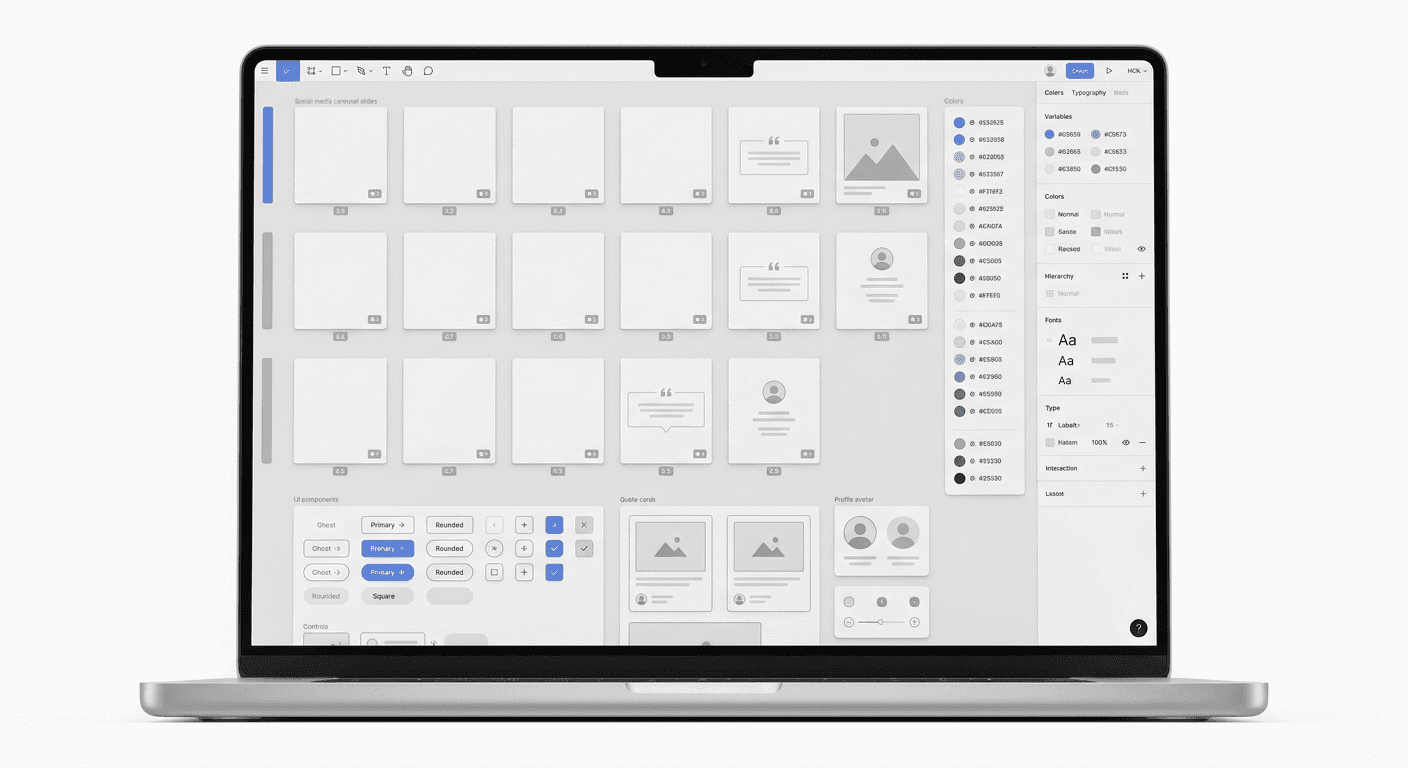
A social media design system is a centralized library of reusable components, styles, and guidelines in Figma used to produce marketing content. It ensures consistent social media branding across all platforms while reducing the time spent on manual layout adjustments.
A social media design system is the logical extension of a product design system into the marketing workflow. While product teams use Figma to build UI components for software, marketing teams use it to create a predictable framework for visual storytelling. This system allows founders and marketers to ship high-quality carousels, ads, and posts without starting from a blank canvas every time. By centralizing assets, you eliminate the friction of hunting for logos or hex codes.
What is a social media design system?
A social media design system is a specialized collection of design tokens, components, and templates designed specifically for social media platforms. It acts as a single source of truth for your brand's visual output, ensuring that every post on LinkedIn, Instagram, or X looks like it came from the same company. Unlike a static brand manual, this system is a living marketing component library that lives inside Figma, ready for immediate use.
The core of this system is the transition from individual graphics to a modular architecture. Instead of designing a one-off post, you build a set of rules and reusable parts. This approach mirrors the way modern SaaS companies build software. According to research, companies with a mature design system improve their design-to-development efficiency by up to 34% (Forrester, 2021). For marketing, this translates to producing 10 carousels in the time it used to take to design one. It turns design from a bottleneck into a scalable engine.
A social media design system is a framework that prioritizes speed and cohesion. It includes predefined typography scales, color palettes (or saas design tokens), and component sets for common social elements like call-to-action buttons, quote blocks, and charts. When you build this in Figma, you use features like Auto Layout and Variables to make the system responsive. This means your content adapts to different aspect ratios automatically, whether you are posting a vertical LinkedIn slide or a square Instagram post. It is the foundation of a modern b2b visual identity.
Why does your brand need a marketing component library?
The answer is brand recall and operational speed. In a saturated feed, your audience needs to recognize your content instantly without looking at the profile handle. Consistent social media branding can increase revenue by up to 33% by building trust and professionalism (Marq, 2022). Without a system, your marketing team likely spends hours every week tweaking fonts and moving pixel-perfect elements, which is a waste of high-level creative energy.
Most startups struggle with a disjointed aesthetic because different team members create content using different files. One post uses a 16px corner radius, while the next uses 8px. These tiny inconsistencies signal an amateur operation to sophisticated buyers. A marketing component library solves this by forcing every designer and creator to use the same approved assets. It removes the guesswork from the creative process, allowing you to focus on the message rather than the pixels. This is particularly vital for SaaS founders who need to maintain a premium image while moving at high velocity.
The ROI of implementing these systems is quantifiable in the digital marketing space. Research indicates that brand consistency across all platforms leads to a 20% increase in overall brand value (Lucidpress, 2021). When your visual language is unified, each post reinforces the previous one, creating a compounding effect on your audience's memory. By using a social media design system, you stop treating social media as a series of chores and start treating it as a scalable asset. It allows a small team to produce the output of a full-scale agency without the overhead costs.
How do you set up brand guidelines figma styles for social media?
The process starts by defining your foundation styles, which are the atomic units of your design system. These include your primary and secondary colors, typography scales, and grid systems optimized for social platforms. In Figma, you save these as Styles or Variables so they can be applied to any new frame with a single click. This ensures your b2b visual identity remains intact even when you are experimenting with new content formats.
Start with your color palette. Most B2B brands need more than just a primary color. You need a range of neutrals for backgrounds and high-contrast accents for call-outs. When you define these as saas design tokens, you can quickly switch between 'Light Mode' and 'Dark Mode' versions of your carousels. This flexibility is essential for staying fresh in the feed. Next, set your typography. For social media, legibility is the priority. Use large font sizes, typically no smaller than 32px for body text on a 1080px wide frame, to ensure readability on mobile devices (Nielsen Norman Group, 2022).
Token Category | Marketing Use Case | Figma Feature |
|---|---|---|
Brand Colors | Backgrounds, accents, text hierarchy | Color Variables |
Typography Scale | Headlines, body text, captions | Text Styles |
Spacing Scale | Padding between elements, margins | Number Variables |
Corner Radius | Buttons, image frames, cards | Number Variables |
Establishing these brand guidelines figma styles prevents the 'franken-design' effect where every slide looks slightly different. Use a grid system based on an 8px or 4px scale. This mathematical approach to spacing ensures that every element feels balanced. For a standard 1080x1350 carousel slide, we recommend a 48px or 64px margin on all sides. This safe zone keeps your text from being cut off by the user interface elements of LinkedIn or Instagram. Once these styles are locked, you can begin building the actual components your team will use daily.
Which components should be in your marketing library?
Your library should contain every recurring element found in your social posts, such as avatars, quote cards, data visualizations, and device mockups. Each of these elements should be a 'Main Component' in Figma, allowing you to push global updates instantly. If you decide to change the style of your quote cards, you edit the master component once, and every post in your library updates automatically. This is the power of a social media design system.
Focus on creating high-value components first. For B2B companies, this often means social proof blocks, feature highlight cards, and 'step-by-step' list items. Use Figma's Component Sets to create variants of each item. For example, a single 'Button' component might have 'Primary', 'Secondary', and 'Outline' variants. This allows a marketer to swap styles from a dropdown menu without needing to search for a new asset. This level of organization is what separates a professional marketing component library from a messy folder of old design files.
Instagram carousels with a mix of images and videos earn the highest engagement rate per post, averaging 1.92% (Socialinsider, 2024).
Building these components with Auto Layout is non-negotiable. Auto Layout allows your components to grow or shrink based on the text content inside them. If you have a quote block and the quote is longer than expected, the container will expand automatically, maintaining the correct padding. This feature makes your system accessible to non-designers. A founder can simply type their thoughts into a template and the design will adjust itself. This ensures that the b2b visual identity remains polished regardless of who is creating the final post. You can even use Figma-based templates to kickstart this process if you don't want to build everything from scratch.
How do you organize saas design tokens for marketing?
Organizing tokens for marketing requires a shift from technical naming to functional naming. Instead of naming a color 'Blue-500', name it 'Action-Primary' or 'Brand-Main'. This semantic naming convention helps marketing teams understand exactly where and why a color should be used. For a social media design system, tokens should cover color, typography, spacing, and effects like shadows or blurs. This structured approach ensures consistency even as the brand evolves.
In Figma, use Variables to manage these tokens. Variables allow you to store values that can be reused across different properties. For a SaaS brand, you might have tokens for 'Surface-Background', 'Text-Primary', and 'Accent-Border'. When you update the brand identity, you simply change the variable value. This propagates the change through your entire marketing component library. This level of control is vital for scale-ups that need to pivot their visual direction quickly without manual rework across hundreds of past templates.
Spacing tokens are equally important for consistent social media branding. Instead of guessing the gap between a headline and a paragraph, use a spacing token like 'Space-24'. This creates a rhythmic, professional look that human eyes perceive as high quality. Consistency in spacing is a subtle signal of expertise. When users see perfectly aligned content, they associate that precision with the product itself. Design systems are not just about aesthetics; they are a psychological tool to build authority in your niche. By standardizing these small details, you elevate the perceived value of your startup.
How can you optimize Figma carousels for different platforms?
The answer is to build flexible templates that accommodate the specific constraints of each platform's aspect ratio and interface. LinkedIn and Instagram both favor the 4:5 portrait ratio (1080x1350 pixels) for carousels because it occupies the most vertical screen real estate. Your social media design system should include a primary 'Master Slide' in this ratio, with variants for 1:1 (square) and 9:16 (Stories/Reels) to ensure your message reaches every segment of your audience.
Platform optimization also involves respecting 'safe zones'. Social platforms overlay UI elements like the 'Like' button, captions, and navigation arrows over your content. If your text is placed in these areas, it becomes unreadable. A professional social media design system includes a 'Safe Zone' overlay component that you can toggle on and off. This ensures that your brand guidelines figma workflow always accounts for the final user experience on mobile devices. Designing with these constraints in mind prevents the need for last-minute edits after a post has been published and found to be illegible.
Carousels are the most effective way to share deep technical knowledge or storytelling on social media. Data shows that carousels on LinkedIn generate significantly higher engagement than static images because they encourage users to stay on the post longer (Socialinsider, 2025). By having a marketing component library ready, you can turn a blog post or a product update into a 10-slide carousel in minutes. You simply drag and drop your content into the pre-made layouts, confident that the fonts, colors, and margins are already perfect. This speed allows you to capitalize on trending topics while they are still relevant.
How do you maintain a social media design system over time?
Maintenance requires a single owner and a clear process for adding or retiring components. A system that is never updated will eventually become a burden, as teams will stop using it if it doesn't reflect the current marketing needs. Treat your social media design system as a product. Schedule a monthly audit to see which components are being used frequently and which ones are being ignored. This feedback loop ensures the library stays lean and useful for the entire team.
Documentation is the final piece of the puzzle. Within your Figma file, use the description field of components to explain how they should be used. For example, a 'Hero Card' might have a note: 'Use this only for slide 1 of a carousel. Do not use for mid-slide content.' This prevents the misuse of assets and maintains a high bar for b2b visual identity. When a new hire joins the marketing team, they should be able to look at the Figma file and understand the brand guidelines figma rules within thirty minutes. This reduces onboarding time and ensures work quality remains high from day one.
As your company grows, your needs will change. You might move from simple image-based posts to complex data visualizations or video-heavy content. Your system must evolve to support these new formats. Use 'Version History' in Figma to track changes and allow the team to roll back if an experiment doesn't work out. By maintaining a disciplined approach to your marketing component library, you ensure that your brand remains a premium, established presence in the market. Consistent social media branding is not a one-time project; it is a continuous commitment to excellence in communication.
References
The Total Economic Impact Of Design Systems. Forrester, 2021.
The State of Brand Consistency. Marq, 2022.
2021 Content Strategy Report. Lucidpress, 2021.
Typography for Mobile Devices. Nielsen Norman Group, 2022.
Social Media Industry Benchmarks. Socialinsider, 2024.
The State of LinkedIn Marketing. Socialinsider, 2025.



