How to write alt text for blog images without keyword stuffing
Write useful alt text for blog images by deciding whether each visual is informative, decorative, functional, textual, or complex.
The same photo of a founder speaking appears on two pages. On the About page, it establishes who the founder is. In a blog layout, it sits behind a quote as decoration. The pixels are identical, but the correct alt text is not.
Alt text describes the information or function an image provides in its context. It is not a caption copied into code, a filename rewritten as a sentence, or a slot for extra keywords.
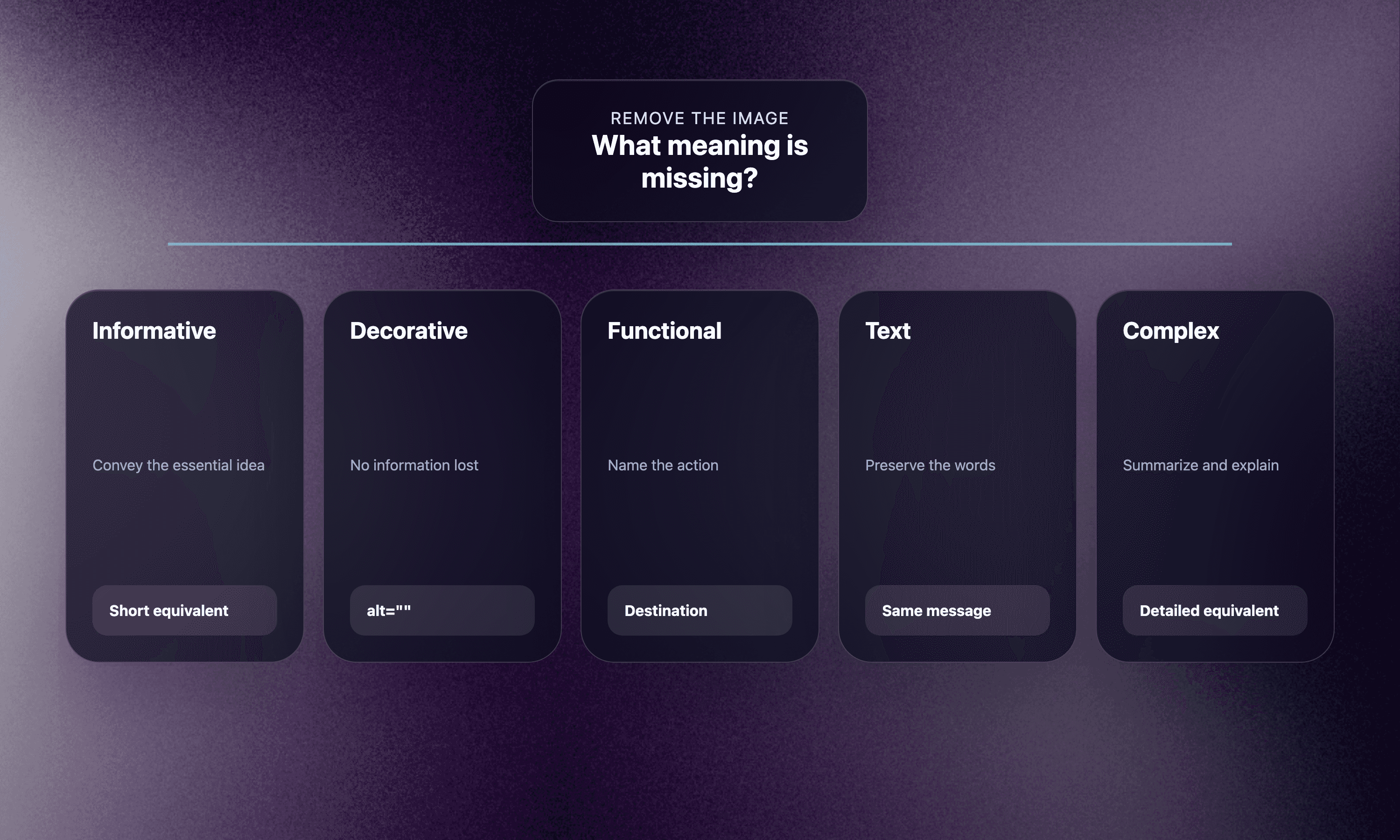
Use a five-branch decision tree before writing.
Branch 1: informative images
An informative image adds meaning a reader needs. Write a concise equivalent of that meaning.
Article context: a screenshot shows the final state of a four-lane content audit board.
Weak:
content audit project management screenshot SEO workflow
Better:
Content audit board with page cards grouped into keep, improve, combine, and retire lanes.
The better version conveys the organization the screenshot demonstrates. It does not describe every color or decorative shadow.
W3C’s image tutorial says informative-image alternatives should convey the essential information represented. “Essential” depends on why the image is present.
Branch 2: decorative images
If an image adds no information and performs no function, use an empty alt attribute: alt="".
Examples:
A gradient behind a heading
A flourish between sections
A redundant stock photo beside text that already says everything
An avatar repeated next to a visible author name, when it adds no required identity information
Do not omit the alt attribute. Empty alt tells assistive technology that the image can be ignored. A missing attribute may cause a screen reader to announce the filename.
Decoration is a contextual decision. The same photograph may be informative in a case study and decorative in a card where the person’s name and role already provide the meaning.
Branch 3: functional images
When an image is a link, button, or control, describe the action or destination.
Weak:
arrow icon
Better:
Next article
Weak:
printer
Better:
Print this checklist
The visual object is less important than what activating it does. Avoid repeating adjacent link text. If an image and nearby text form one link, provide one clear accessible name rather than announcing both.
Branch 4: images containing text
Avoid putting important text inside images when normal HTML can present it. Text in images does not adapt as well to zoom, translation, reflow, themes, or user preferences.
When an image contains words essential to understanding, the alternative should include the same message. A screenshot of a testimonial card may need the meaningful quote and attribution if no equivalent appears nearby.
If the visible article already presents the complete text next to the image, use empty alt or a short description according to the image’s remaining purpose. Do not force someone using a screen reader to hear the paragraph twice.
Branch 5: complex images
Charts, diagrams, maps, and detailed interfaces may need more than one sentence.
Provide:
A concise alt text identifying the visual and its main conclusion
A nearby detailed explanation, data table, or transcript
Example alt:
Line chart showing newsletter clicks recovering after the second re-engagement email, then leveling off.
Nearby text or a table should provide values, dates, segments, and caveats. Do not cram the entire dataset into the alt attribute.
Use the “remove the image” test
Temporarily imagine the image is gone. What information or action is now missing?
Nothing: decorative, likely
alt="".A simple fact or identity: concise informative alt.
An action: functional alt.
Important visible words: include the equivalent unless already present.
A relationship or dataset: short alt plus a detailed equivalent.
This test keeps the wording connected to purpose.
Rewrite common bad examples
Keyword list
Bad:
AI content workflow marketing automation founder SEO blog image
Useful:
Workflow diagram connecting a research brief, article review, image render, and publication log.
Filename
Bad:
IMG_4482-final-v3.png
Useful:
Editor comparing two versions of a product claim beside their supporting sources.
Visual overload
Bad:
Purple rectangular dashboard with rounded corners, shadows, small white cards, blue circles, arrows, labels, dots, and a dark background.
Useful:
Dashboard routing overlapping pages toward rewrite, canonical, or redirect decisions.
Redundant phrase
Bad:
Image of a content audit board
Useful:
Content audit board sorting pages by the action required.
Assistive technology already identifies an img element as an image in common contexts, so “image of” is usually unnecessary.
Keep SEO in its proper place
Google’s image SEO documentation says alt text helps Google understand an image alongside computer vision and page context. It recommends useful, information-rich wording in context and warns against keyword stuffing.
That does not turn alt text into a ranking field to maximize. Describe the image’s meaning naturally. If a relevant phrase accurately belongs there, use it. If not, forcing it harms clarity.
Other image practices matter too:
Use normal HTML image elements for important content.
Choose descriptive filenames.
Place images near relevant text.
Use sharp, responsive assets with a fallback
src.Keep page performance in mind.
Alt text cannot repair an irrelevant image or a slow, inaccessible implementation.
Create an editorial field with context
Do not ask a designer or AI tool to write alt text from the image alone. Provide:
Page title
Nearby heading and copy
Image purpose
Information that must be conveyed
Whether a detailed equivalent exists
The same dashboard screenshot may need different alternatives in a tutorial and a product overview because each page uses it for a different reason.
Store alt text with the article metadata, not inside a random upload note. It should travel with the asset through the publishing handoff.
Check implementation, not only wording
Before publication:
Confirm every meaningful
imghas analtattribute.Confirm decorative images use
alt="".Avoid duplicate announcement from captions or adjacent links.
Test linked images for a clear action name.
Ensure complex visuals have a nearby equivalent.
Verify localized pages localize the alternative.
Inspect the rendered page with images unavailable when possible.
An automated checker can find missing attributes. It cannot reliably decide whether the wording is equivalent in context.
Read the page aloud without the images
Use the alt text in sequence with the surrounding copy. Does it add the missing meaning once, at the right moment? Does it interrupt with visual trivia? Does a chart still communicate its conclusion and details?
This final test catches problems a field-by-field checklist misses.
Good alt text is often short because the workflow made the image’s job clear. Decide whether the visual informs, decorates, acts, contains text, or carries complex information. Then provide the equivalent experience the reader needs: no more, no less.
Treat generated visuals like any other image
An AI-generated illustration still needs a purpose-based alternative. Do not describe the generation method unless it matters to the article. Describe the information the published visual contributes.
Inspect generated images for text errors, invented interface elements, misleading charts, and details that cannot be responsibly summarized as fact. If the visual is purely atmospheric, empty alt may be correct. If it represents a workflow, the alternative should convey that workflow rather than narrating every decorative object.



