Creating B2B YouTube Shorts Thumbnail Design Fast in 2026
Master b2b youtube shorts thumbnail design to increase CTR. Learn how to use a figma thumbnail template to batch-create professional covers that convert.
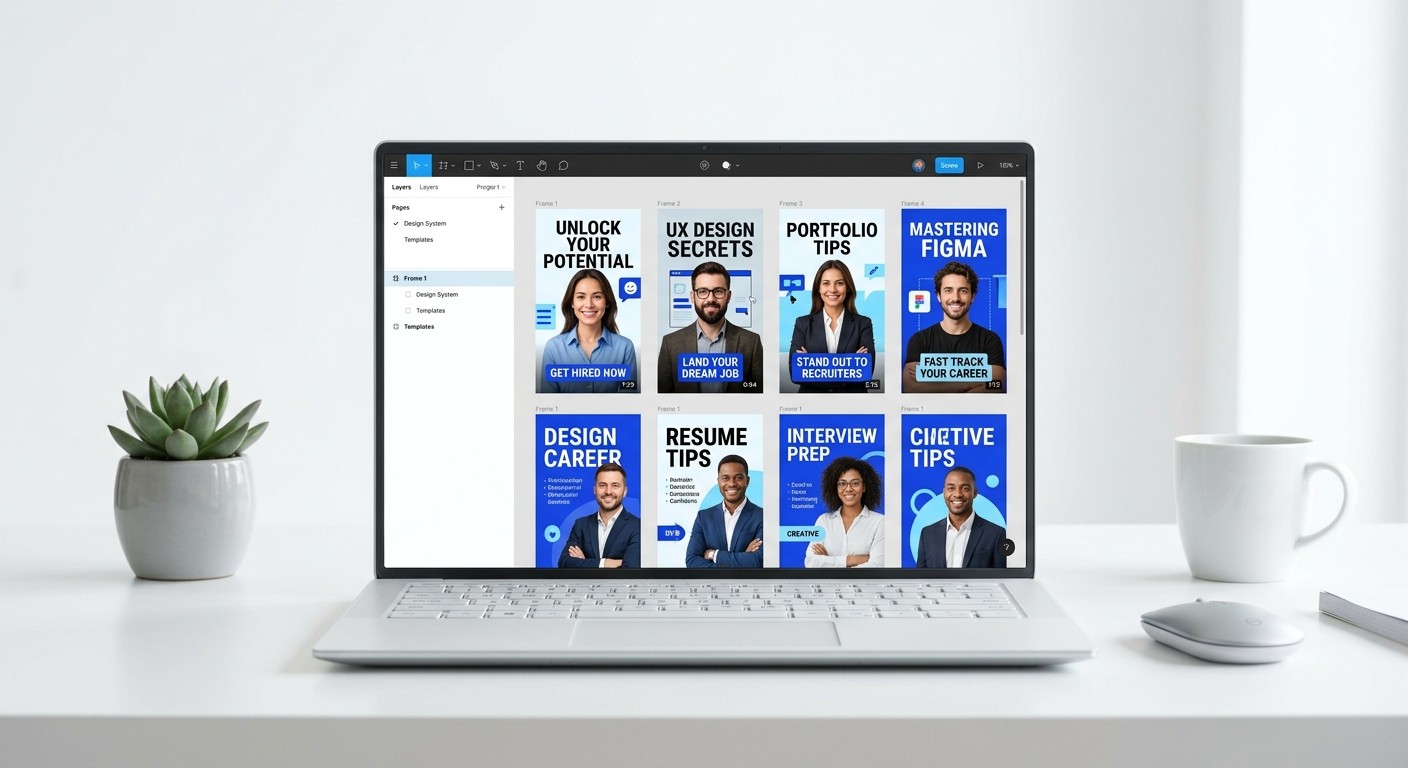
B2B youtube shorts thumbnail design is the strategic process of creating high-intent preview images that balance professional brand authority with the aggressive visual triggers required for vertical video feeds. Effective B2B covers prioritize legibility and human connection over the exaggerated graphics common in consumer-facing content.
B2b youtube shorts thumbnail design is the standard for founders and marketers who need to capture attention without compromising their brand integrity. Unlike entertainment thumbnails that rely on shock value, a professional cover uses clear typography, brand-consistent color palettes, and recognizable faces to build trust. We see this as a requirement for any company looking to turn 60-second clips into a reliable lead generation engine.
YouTube Shorts now generate over 70 billion daily views (Google, 2024). This volume makes the competition for the initial click intense even in narrow niches. To succeed, your thumbnail must act as a visual elevator pitch that communicates your value proposition in less than 500 milliseconds.
Why is B2B YouTube shorts thumbnail design different from consumer content?
The answer is that professional thumbnails focus on utility and authority rather than high-arousal emotions or clickbait. B2b youtube shorts thumbnail design requires a layout that respects corporate brand guidelines while using contrast to stand out in the mobile feed. Professional audiences respond to clarity and the promise of a solution to a specific business problem.
In our experience, a B2B viewer is looking for an answer, not a distraction. If a thumbnail looks too much like a viral prank video, a SaaS founder or CTO will likely scroll past it. They are protective of their time and prioritize content that signals expertise. High-quality short form video covers for a business audience often feature a single, high-resolution headshot of the speaker combined with three to four words of bold text. This simplicity is a hallmark of premium branding and helps separate your company from the noise of the general feed.
According to research, 86% of B2B marketers use video as a marketing tool, and 92% say it gives them a good return on investment (Wyzowl, 2023). To capture this ROI, your thumbnails must bridge the gap between social media trends and professional expectations. Use a clean background, avoid neon glow effects, and ensure your logo is present but subtle. This approach ensures that your content is perceived as a valuable asset rather than a low-quality advertisement. By maintaining these boundaries, you build a cohesive brand identity that attracts high-value prospects who value professional excellence.
Element | Consumer (B2C) Style | Professional (B2B) Style |
|---|---|---|
Facial Expression | Exaggerated shock or anger | Natural, confident, or neutral |
Typography | Distorted, bright yellow or red | Clean Sans-Serif, brand colors |
Background | Busy, cluttered, or glowing | Minimalist, office, or solid color |
Core Goal | Maximum curiosity/click | Immediate authority/utility |
How do you design high ctr thumbnails for SaaS products?
The solution for high ctr thumbnails in the SaaS sector is to visualize the outcome of the product rather than the features. Instead of showing a screenshot of a complex dashboard, show a clean graphic of a metric increasing or a simplified UI element that highlights a specific benefit. This visual shorthand helps the viewer understand the "why" of your video instantly.
Contrast is your most powerful tool in a mobile-first environment. Since YouTube Shorts are viewed primarily on phones, your thumbnail must be readable at a very small size. We recommend using a dark background with light text or a white background with dark, bold lettering. Avoid thin fonts or script styles that disappear when scaled down. Your visual hooks shorts strategy should start with the thumbnail text, which must be large enough to take up at least 30% of the frame without feeling crowded.
Data suggests that video content with custom thumbnails can see a 34% higher play rate compared to those without (Social Media Examiner, 2023). For a SaaS startup, this increase translates directly to more demos booked or more trials started. When we build covers, we prioritize a clear focal point. If the video is an interview, the focal point is the guest. If it is a product walkthrough, the focal point is a simplified UI component. This hierarchy directs the eye and makes the decision to click much easier for the user who is scrolling quickly through their feed.
How can you use a figma thumbnail template to speed up production?
A figma thumbnail template is a pre-structured design system that uses components and auto-layout to allow for the rapid creation of video covers. By setting up a master template, you can swap text and images in seconds while maintaining a consistent brand aesthetic across every piece of content. This eliminates the need for manual resizing or alignment every time you post a new video.
Start by creating a frame at 1080x1920 pixels to match the vertical aspect ratio of Shorts. Use Figma components for your recurring elements like headshots, logos, and call-to-action buttons. When you need to create a new batch of thumbnails, simply duplicate the frame and update the text content. If you want to scale your output without hiring a full-time designer, using a Figma-based design template helps you maintain a premium look while spending only a few minutes on each asset. This workflow is especially effective for agencies managing multiple client accounts simultaneously.
Standardizing your design process reduces the cognitive load on your team. Instead of starting from a blank canvas, you are simply filling in a proven framework. This consistency is not just a time-saver; it is a brand builder. When a prospect sees three of your Shorts in a row, they should recognize the visual style immediately. Consistent use of specific font weights and color tokens reinforces that you are an established, premium company. Many teams find that moving to a component-based system in Figma allows them to increase their content volume by 3x without increasing their design budget or headcount.
What are the technical requirements for short form video covers?
The technical requirements for Shorts thumbnails include a 9:16 aspect ratio (1080x1920 pixels) and a file size under 2MB. While YouTube often selects a frame from the video automatically, uploading a custom cover gives you control over the first impression your content makes. You must ensure that your text is not placed in the "safe zones" where the UI elements of the app (like the like button or title) will obscure it.
Safe zones are the areas of the screen where the app interface is overlaid on your video. On YouTube Shorts, the bottom 20% and the right 10% of the screen are usually covered by buttons and metadata. Keep your text and main visual elements centered or slightly toward the top of the frame to ensure they remain visible. If your short form video covers have text that is covered by the "Subscribe" button, your click-through rate will drop because the message is lost.
Testing your designs on actual mobile devices is a critical step. A design that looks perfect on a 27-inch monitor may be unreadable on a 6-inch smartphone screen. We suggest zooming out to 10% in Figma to simulate how the thumbnail appears in a busy feed. If you cannot read the text or recognize the main subject at that size, your design is too complex. Aim for high saturation and sharp edges to ensure the image looks crisp on high-resolution mobile displays. This attention to detail signals professional quality and separates you from amateur creators who rely on the default, blurry frames chosen by the algorithm.
How do visual hooks shorts improve viewer retention?
Visual hooks in the context of thumbnails are elements that create a "pattern interrupt" in the user's feed. The goal is to stop the scroll by presenting something unexpected but relevant to the viewer's professional interests. This might be a surprising statistic, a recognizable software logo, or a high-contrast graphic that stands out against the standard video background.
A pattern interrupt is a psychological trigger that breaks a repetitive habit, such as mindlessly scrolling through a social media feed. In saas video marketing, this hook should be tied directly to a pain point. For example, a thumbnail showing a "0%" conversion rate next to a "100%" growth chart is a powerful visual hook for a founder. It promises a transformation that the viewer wants to understand. This visual promise must be fulfilled within the first three seconds of the video to maintain high retention rates.
Research from various platforms indicates that the first three seconds of a video are the most important for viewer retention (Wyzowl, 2024). Your thumbnail is the pre-hook that sets the stage for those three seconds. If the thumbnail and the video opening are perfectly aligned, the transition is smooth, and the viewer is more likely to stay. If there is a disconnect, the viewer will feel misled and skip the content. This is why we recommend using the exact same text in your thumbnail as the header in your first video frame. This repetition reinforces the topic and assures the viewer they are in the right place, increasing the likelihood they will watch the entire Short.
Visual hooks are the currency of the attention economy. In a B2B environment, these hooks must be grounded in reality and data to remain effective over the long term.
How do you maintain brand authority in professional video covers?
Brand authority is maintained by adhering to a consistent set of visual rules across all short form video covers. This includes using a specific font family, a limited color palette, and a consistent composition style. When these elements are repeated across dozens of videos, they create a cohesive brand identity that signals stability and expertise to your target audience.
Typography is often the most important factor in B2B design. We recommend choosing one primary font for all your thumbnails. A bold, modern sans-serif like Inter or Satoshi is often the best choice for SaaS companies because it looks professional and remains legible at small sizes. Avoid using more than two different font weights in a single thumbnail. Too many variations make the design look cluttered and amateur, which can damage the credibility of your message before the viewer even hears it.
Color choice also plays a massive role in how your brand is perceived. High-contrast pairings like navy blue and white or black and bright orange are effective for grabbing attention while remaining professional. Avoid using too many colors in a single image. Stick to your primary brand color and one or two neutral tones. This minimalist approach ensures that your message is the focal point, not the design itself. In our experience, founders who invest in a structured design system for their social media presence see higher engagement because their content looks like it comes from a premium, established company rather than a side project.
Why should you prioritize b2b youtube shorts thumbnail design in 2026?
Investing in b2b youtube shorts thumbnail design is no longer optional for companies that want to scale through organic video content. As more businesses enter the short-form video space, the baseline for quality is rising. To compete, you need a workflow that allows you to produce high-quality, high-CTR covers without spending hours on every single post. Using a figma thumbnail template and focusing on visual hooks shorts will help you achieve this balance.
By following the principles of clarity, contrast, and consistency, you can build a video presence that generates leads and builds brand equity. Your thumbnails are the front door to your content. Ensure they are professional, inviting, and clearly communicate the value you provide. This strategic approach to design will help you stand out in the feed and turn casual viewers into loyal advocates for your brand.
References
YouTube Shorts Daily Views. Google Official Blog, 2024.
Video Marketing Statistics 2023. Wyzowl, 2023.
The State of Video Marketing 2024. Wyzowl, 2024.
B2B Content Marketing Benchmarks, Budgets, and Trends. Content Marketing Institute, 2023.
How YouTube Thumbnails Affect CTR. Social Media Examiner, 2023.



