15 Best Free Figma Icons Social Media Teams Need in 2026
Discover the best free figma icons social media teams use to scale B2B brands. Curated list of clean vector icons and minimalist sets for high-performing posts.
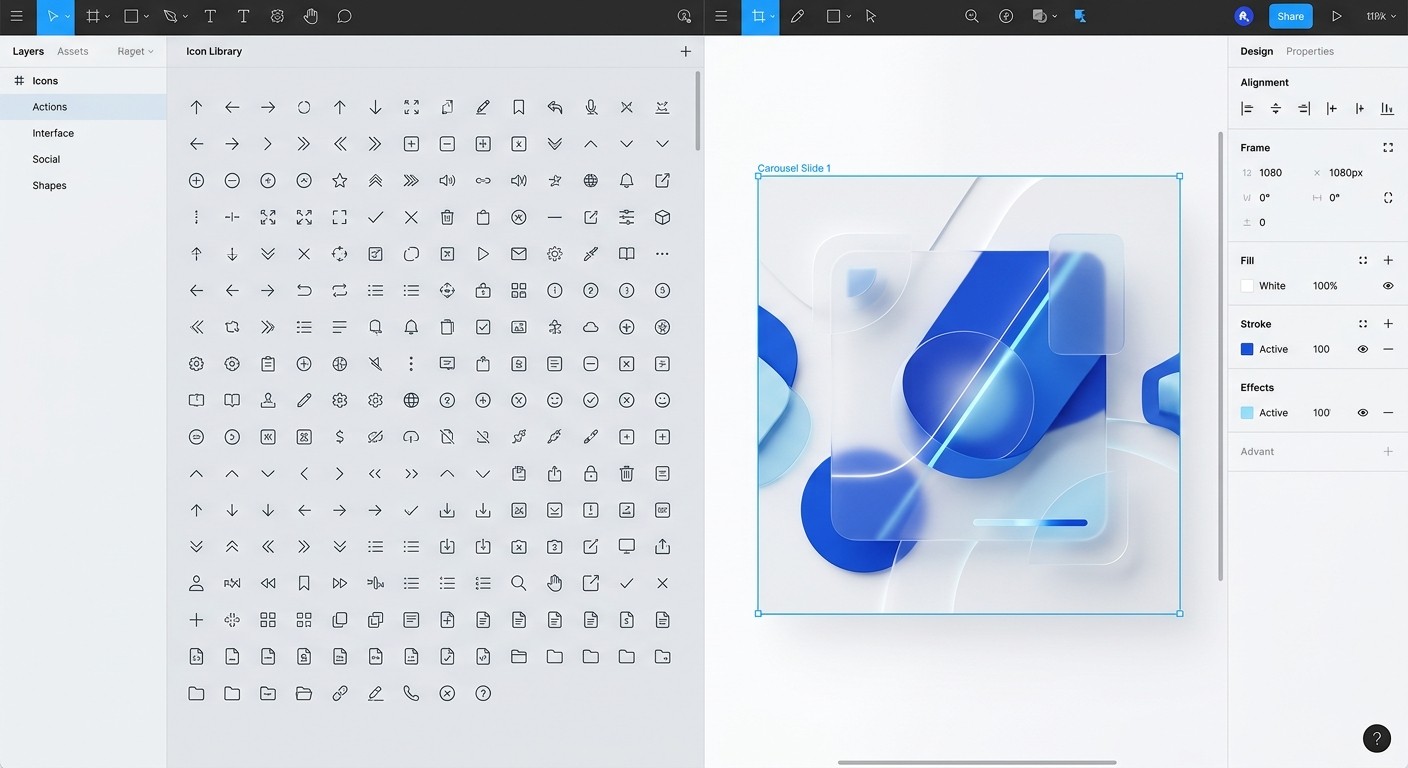
Free figma icons social media collections are standardized vector libraries that allow marketing teams to maintain professional brand consistency across digital platforms. These assets eliminate the need for custom illustrations while ensuring content looks premium and authoritative. Use this curated list to speed up your content production without sacrificing design quality.
What are the best free figma icons social media teams use?
Free figma icons social media libraries are open-source collections of scalable vector graphics that creators use to simplify complex information. These icons act as visual anchors in carousels and infographics, helping users navigate dense text more efficiently. High-quality iconography is a core component of a professional design system because it ensures every piece of content feels like it belongs to the same brand identity.
Design consistency is a primary driver of user trust in the B2B sector. Research shows that 75% of users judge a company’s credibility based on its website and visual design elements (Stanford University, 2023). When your social media graphics use a mishmash of different icon styles, you signal a lack of attention to detail that can undermine your authority. By selecting a single, comprehensive library of clean vector icons figma files, you establish a reliable visual language for your audience.
Most professional teams prefer libraries like Lucide or Phosphor because they offer extensive variety and easy customization. These sets allow you to adjust stroke weights and corner radii to match your brand's specific aesthetic. Integrating these assets into your workflow reduces the time spent on manual design work, allowing you to focus on strategy and lead generation. This efficiency is critical for SaaS startups that need to publish high-frequency content to stay relevant in competitive feeds.
Why do SaaS founders need specialized b2b icon sets?
B2B icon sets are specialized collections of vector graphics designed to represent professional concepts like data security, cloud infrastructure, or enterprise scalability. Unlike consumer-oriented emojis, these sets prioritize precision and technical clarity to maintain brand authority. Research indicates that 40% of B2B buyers find that high-quality visual representations of technical concepts significantly influence their perception of a vendor's expertise (Demand Gen Report, 2023). When startups use inconsistent or low-resolution graphics, it signals a lack of attention to detail that can deter high-ticket clients. By standardizing on a single, clean vector library, teams ensure that every LinkedIn post or technical whitepaper reinforces a cohesive brand identity. This consistency is vital because the human brain processes visual information 60,000 times faster than text, making the visual shorthand of an icon a primary driver of initial user trust and information retention (3M Research, 2001).
Standardizing on professional b2b icon sets also simplifies the collaboration between marketing and product teams. When your social media posts use the same visual language as your SaaS dashboard, you create a seamless experience for the user. This familiarity reduces cognitive load and makes your product feel more intuitive even before a lead signs up for a trial. We recommend choosing sets that offer multiple weights, such as light, regular, and bold, to provide flexibility for different content formats.
Using these icons effectively requires an understanding of visual hierarchy. Icons should never compete with your headlines; they should support them. Place icons next to bullet points or use them as large background elements with low opacity to add depth to your slides. This technical approach separates professional startup content from amateur attempts that rely on generic stock imagery.
How do minimalist marketing icons increase post engagement?
Minimalist marketing icons improve engagement by reducing the effort required to consume information. In an era of infinite scrolling, users skim content looking for immediate value. Simple, geometric icons serve as signposts that highlight key takeaways and data points. When you use clean visuals, you increase the likelihood that a user will stop scrolling and interact with your post.
Data supports the move toward visual-heavy content in professional environments. Recent studies found that LinkedIn carousels using clear iconography and minimal text generate a 2.2% engagement rate compared to 1.5% for static images (Socialinsider, 2025). This difference in performance directly impacts your reach and lead generation potential. Icons make your content more shareable because they transform abstract ideas into digestible, visual nuggets that others want to show their own networks.
To maximize engagement, ensure your minimalist marketing icons are large enough to be legible on mobile screens. Most social media consumption happens on devices where small details are easily lost. We find that using a consistent 24px or 32px grid for your icons ensures they remain crisp across all devices. This technical discipline prevents your content from looking cluttered or disorganized during the export process.
Which social media glyphs are essential for carousel navigation?
Social media glyphs are small, functional symbols used to guide users through multi-slide posts or interactive stories. These include arrows, swipe indicators, and save buttons that prompt specific user actions. Without these navigational cues, users may not realize there is more content to explore, leading to lower completion rates for your carousels. These glyphs must be prominent and placed in predictable locations, such as the bottom right corner of a slide.
The effective use of navigation glyphs can significantly boost the performance of educational content. In 2024, approximately 54% of B2B marketers reported that producing visual content consistently is their biggest challenge (Content Marketing Institute, 2024). This difficulty often stems from the time required to create custom graphics for every slide. By using a standardized set of social media glyphs, you can create a reusable framework for all your posts. This allows you to focus on the copy and data while the navigation remains consistent. Consistent placement of "swipe" prompts and "save for later" icons trains your audience on how to interact with your brand over time. When these symbols are part of a high-quality icon set, they blend into the design rather than looking like an afterthought. This level of polish is what differentiates premium SaaS brands from their competitors.
We recommend integrating these glyphs into your master components in Figma. By setting up auto-layout buttons for your calls to action, you can swap icons and update text in seconds. This speed is essential for maintaining a daily posting schedule on platforms like LinkedIn or Instagram where recency is a key ranking factor.
Where can you source premium free figma resources for startups?
Premium free figma resources are high-quality design assets shared by the community or specialized studios to help creators build faster. These resources often include not just icons, but full UI kits, templates, and style guides. Finding the right source is about quality over quantity; it is better to have one perfect icon set than ten mediocre ones. The Figma Community tab is the best place to start, but you must filter for sets that offer "variable" support or comprehensive SVG exports.
When searching for premium free figma resources, prioritize sets that are actively maintained. Many free files are abandoned after a few months, leaving you with missing icons as new social media features emerge. A professional library like Lucide is updated weekly, ensuring you always have access to the latest symbols for new technology trends. Integrating these resources into a standardized workflow helps teams produce content faster. We use many of these sets when building our Figma carousel templates because they allow for easy customization of stroke weight and color across multiple slides simultaneously.
Top 15 free Figma icon libraries for 2026
The following list represents the most versatile and professional icon sets available for marketing teams today. Each of these libraries offers a unique aesthetic while maintaining the technical standards required for B2B content production.
Icon Library | Key Feature | Best Use Case |
|---|---|---|
Lucide | Highly scalable | SaaS Product UI |
Phosphor | 6 weights included | Modern Carousels |
Feather | Ultra-minimalist | Micro-interactions |
Heroicons | Tailwind CSS native | Developer content |
Remix Icon | Massive variety | Complex Infographics |
Tabler Icons | Over 5,000 icons | Technical documentation |
Iconoir | No-fuss open source | Clean B2B branding |
Boxicons | Web component ready | Website & Social mix |
Unicons | Line and Solid styles | Engagement prompts |
Radix Icons | 15x15 crisp grid | Compact mobile layouts |
Lucide: A community-run fork of Feather with hundreds of additional icons. It is our top recommendation for SaaS founders due to its balance of simplicity and breadth.
Phosphor Icons: This set is famous for its distinct, friendly personality. It offers 6 different weights, making it perfect for creating visual hierarchy in complex carousels.
Heroicons: Created by the makers of Tailwind CSS, these icons are designed specifically for high-end web interfaces and work perfectly for "Product Peek" social posts.
Iconoir: One of the largest open-source libraries, offering a very clean, geometric look that fits the "Apple-like" minimalist aesthetic.
Atlas Icons: A newer library that focuses on consistent stroke terminals and modern shapes, ideal for forward-thinking tech companies.
Eva Icons: This set includes beautiful animations for web use, but the static Figma versions are equally impressive for social media glyphs.
Mono Icons: A set of 177 simple icons that force you to keep your designs clean and focused.
How to implement vector icons into your Figma workflow
Implementing vector icons requires more than just dragging and dropping. To maintain a professional workflow, you must treat icons as components. This allows you to update the color or size of an icon in one place and have that change reflect across every slide in your carousel. This method is the only way to scale content production without introducing errors.
First, create a dedicated "Icons" page in your Figma file. Import your chosen library and convert each icon into a main component. Use a consistent naming convention like "Icon / Name / Style" to make them easily searchable in the assets panel. When you build your social media slides, use instances of these components. If you decide to change your brand’s primary color later, you can update the main component, and your entire 10-slide carousel will update instantly.
Second, utilize Figma's Auto Layout feature to manage the spacing around your icons. Auto Layout ensures that if you swap a short icon for a tall one, the text and margins around it adjust automatically. This technical setup prevents the "amateur look" of misaligned elements. By combining professional free figma icons social media sets with robust layout rules, you create a content engine that produces premium visuals in minutes, not hours.
References
The Power of Visual Communication. 3M Research, 2001.
B2B Content Marketing Benchmarks. Content Marketing Institute, 2024.
The Impact of Design on Trust. Stanford University, 2023.
Visual Content Engagement Study. Socialinsider, 2025.
B2B Buyer Behavior Survey Report. Demand Gen Report, 2023.



